Difference between revisions of "Translations:Save File Supported Format/16/en"

From TaticView
Jump to: navigation, search
(Importing a new version from external source)
(No difference)

Revision as of 04:15, 20 October 2017

Information about message (contribute)

This message has no documentation. If you know where or how this message is used, you can help other translators by adding documentation to this message.

Message definition (Save File Supported Format)
* First, you will have to open your spreadsheet in Excel;
* Then check if the information is being displayed correctly;
* After you have done that, go to the ''File'' option and select ''Save as'';
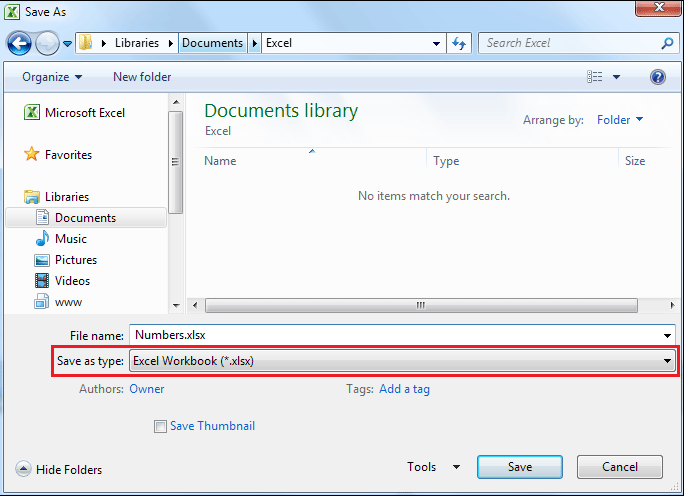
* After selecting ''Save as'', select the Excel's default format or a [[Supported File Formats|format that is supported]] by TaticView on the ''Save as type'' field:
:: [[File:excel_save_as_en-US.png|link=]]
Translation* First, you will have to open your spreadsheet in Excel;
* Then check if the information is being displayed correctly;
* After you have done that, go to the ''File'' option and select ''Save as'';
* After selecting ''Save as'', select the Excel's default format or a [[Supported File Formats|format that is supported]] by TaticView on the ''Save as type'' field:
:: [[File:excel_save_as_en-US.png|link=]]
  • First, you will have to open your spreadsheet in Excel;
  • Then check if the information is being displayed correctly;
  • After you have done that, go to the File option and select Save as;
  • After selecting Save as, select the Excel's default format or a format that is supported by TaticView on the Save as type field:
Excel save as en-US.png