Difference between revisions of "Edit dashboard/en"
(Importing a new version from external source) |
(Updating to match new version of source page) |
||
| (8 intermediate revisions by the same user not shown) | |||
| Line 1: | Line 1: | ||
| − | + | <languages/> | |
| − | + | To edit a dashboard, you must click on the ''Edit dashboard'' option. This option is available in the Dashboards Cards context ''Menu'', in the [[Main Page Overview|Main Page]]: | |
| − | + | {| class="images-table" | |
| − | + | | On desktop | |
| − | + | |- | |
| − | [[File: | + | |[[File:Edit dashboard en-US.png|link=]] |
| − | + | |- | |
| − | + | | In mobile devices | |
| − | + | |- | |
| + | |[[File:Dashboard options mobile en-US.png|link=]] [[File:Edit dashboard mobile en-US.png|link=]] | ||
| + | |} | ||
Latest revision as of 19:50, 11 September 2018
To edit a dashboard, you must click on the Edit dashboard option. This option is available in the Dashboards Cards context Menu, in the Main Page:
| On desktop |
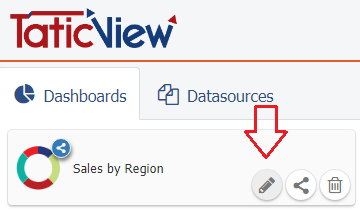
|
| In mobile devices |
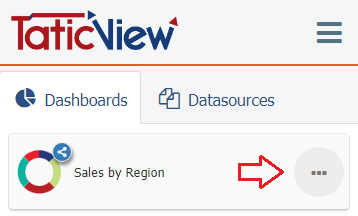 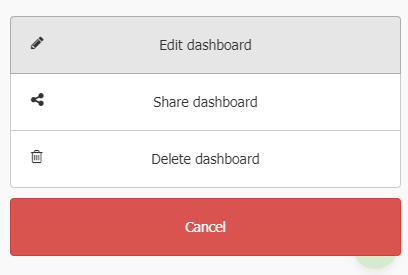
|
