Difference between revisions of "New dashboard"
| (One intermediate revision by one other user not shown) | |||
| Line 4: | Line 4: | ||
<translate> | <translate> | ||
<!--T:1--> | <!--T:1--> | ||
| − | To create a new dashboard, click on the ''New dashboard'' option available on the [[Main Page Overview# | + | To create a new dashboard, click on the ''New dashboard'' option available on the [[Main Page Overview#Main_Menu|Menu]] in the [[Main Page Overview|Main Page]]: |
| Line 21: | Line 21: | ||
<!--T:3--> | <!--T:3--> | ||
| − | After, select the [[Data Sources| | + | After, select the [[Data Sources|Datasource]] from where the dashboard [[Objects]] data will come from; |
Latest revision as of 14:33, 30 September 2022
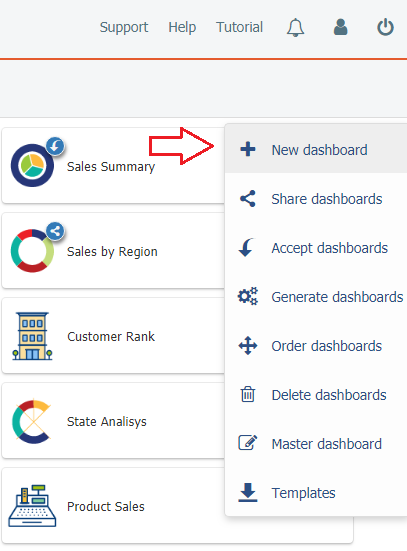
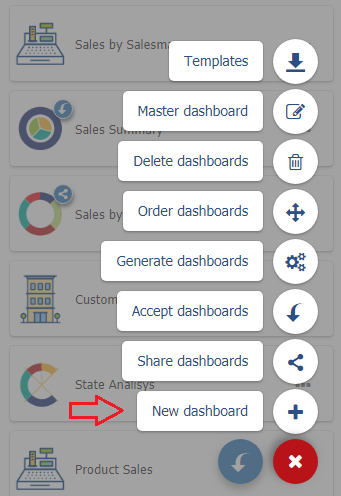
To create a new dashboard, click on the New dashboard option available on the Menu in the Main Page:
| On desktop |
|
| In mobile devices |
|
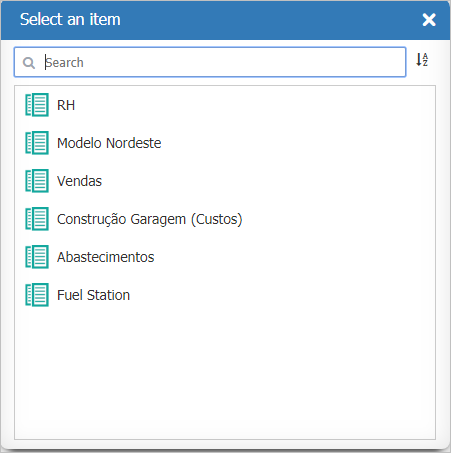
After, select the Datasource from where the dashboard Objects data will come from;
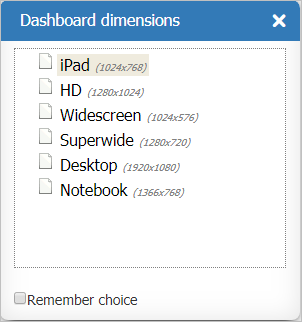
Select the dashboard dimensions this can be changed later. For more information, see Dashboard dimensions property;
See Dashboards Design for instructions on how to design the new dashboard.
