Difference between revisions of "Excel Importing Guide"
(Created page with " '''You can download a sample file here: [http://wiki.taticview.com/taticfiles/Sales.xlsx Sales.xlsx]") |
|||
| Line 1: | Line 1: | ||
| + | The instructions below will help you make sure your Excel file is formatted correctly to be imported as a TaticView data source. | ||
| + | '''You can download a sample file here: [http://wiki.taticview.com/taticfiles/Sales.xlsx Sales.xlsx] | ||
| + | '''Headers''' | ||
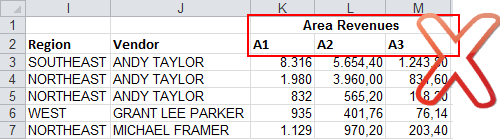
| − | + | Headers should be contained in just one row (the first one) and not be merged. | |
| + | |||
| + | [[File:headers_wrong.png|link=]] | ||
| + | |||
| + | |||
| + | [[File:headers_right.png|link=]] | ||
Revision as of 17:28, 26 August 2014
The instructions below will help you make sure your Excel file is formatted correctly to be imported as a TaticView data source.
You can download a sample file here: Sales.xlsx
Headers
Headers should be contained in just one row (the first one) and not be merged.