Difference between revisions of "Import/Update data"
(Created page with "To update the data source data: * Click on the ''Import/Update data'' option in the Menu (Sidebar) in the [[Main Page Overview|Main Pag...") |
|||
| (25 intermediate revisions by 5 users not shown) | |||
| Line 1: | Line 1: | ||
| − | + | <languages/> | |
| − | + | <translate> | |
| + | <!--T:1--> | ||
| + | To update the datasource data, follow the steps below: | ||
| − | * | + | <!--T:2--> |
| + | * Click on the ''Update datasource'' option in the [[Main Page Overview#Main_Menu|Menu]] in the [[Main Page Overview|Main Page]]: | ||
| − | |||
| + | <!--T:12--> | ||
| + | [[File:Atualizar dados 2 en-US.png|link=]] | ||
| + | <!--T:3--> | ||
| + | * In the select window, choose the datasource you wish to update; | ||
| − | See [[File and identification]] for information on how to continue. | + | |
| + | <!--T:4--> | ||
| + | [[File:Atualizar dados+en-US.PNG|link=]] | ||
| + | |||
| + | |||
| + | <!--T:8--> | ||
| + | * Or click on the ''Update datasource'', displayed when placing the mouse on the datasource card in the [[Main Page Overview|Main Page]]: | ||
| + | |||
| + | |||
| + | <!--T:9--> | ||
| + | [[File:update+en-US.png|link=]] | ||
| + | |||
| + | |||
| + | <!--T:5--> | ||
| + | See '''[[File and identification]]''' for information on how to continue. | ||
| + | |||
| + | |||
| + | <!--T:6--> | ||
| + | <span style="color: red;">'''Important'''</span> | ||
| + | |||
| + | <!--T:7--> | ||
| + | * If you have errors during the importing process, see '''[[Importing Problems]]'''. | ||
| + | |||
| + | <!--T:11--> | ||
| + | * The update of the data is not permitted by tablets and smartphones. | ||
| + | </translate> | ||
Latest revision as of 14:28, 30 September 2022
To update the datasource data, follow the steps below:
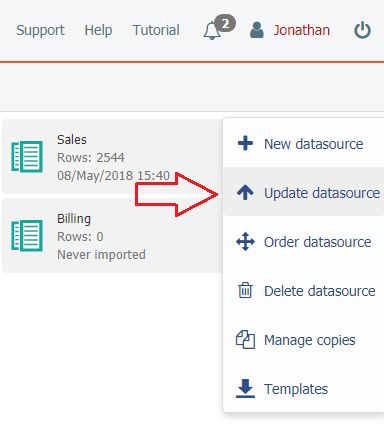
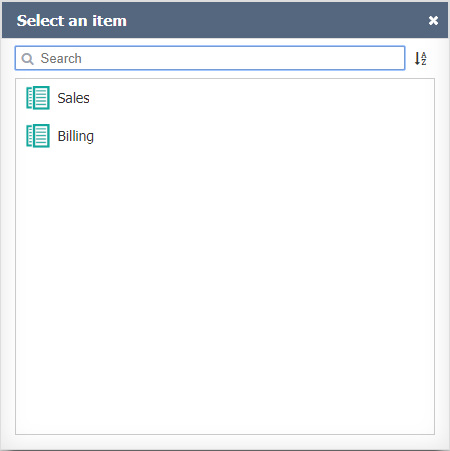
- In the select window, choose the datasource you wish to update;
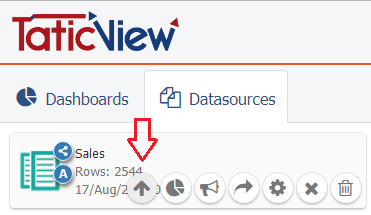
- Or click on the Update datasource, displayed when placing the mouse on the datasource card in the Main Page:
See File and identification for information on how to continue.
Important
- If you have errors during the importing process, see Importing Problems.
- The update of the data is not permitted by tablets and smartphones.