Difference between revisions of "File and identification"
| (11 intermediate revisions by 4 users not shown) | |||
| Line 1: | Line 1: | ||
| − | + | <languages/> | |
| + | <translate> | ||
| + | <!--T:1--> | ||
| + | [[File:Novo arquivo+en-US.PNG||link=]] | ||
| + | |||
| + | |||
| + | <!--T:2--> | ||
* '''File''': Choose the file to be imported. Click on the ''Browser'' button to search your computer for files. See [[Supported File Formats]] for more information; | * '''File''': Choose the file to be imported. Click on the ''Browser'' button to search your computer for files. See [[Supported File Formats]] for more information; | ||
| − | * '''Name''': | + | <!--T:3--> |
| + | * '''Name''': Datasource name. This is the name that will be displayed in the '''[[Main Page Overview|main page]]'''; | ||
| + | |||
| + | |||
| + | <!--T:4--> | ||
| + | * '''Description''': An optional description for the new datasource. | ||
| − | + | <!--T:7--> | |
| + | Access the links to learn more about the '''automating''' process of the data update process, to watch a '''Tutorial Video''', to see an '''model worksheet''' and '''Import Tips'''. | ||
| + | <!--T:5--> | ||
Click on the ''Next'' button. | Click on the ''Next'' button. | ||
| − | See [[Input Data Format]] for information on how to continue. | + | <!--T:6--> |
| + | See '''[[Input Data Format]]''' for information on how to continue. | ||
| + | </translate> | ||
Latest revision as of 14:28, 30 September 2022
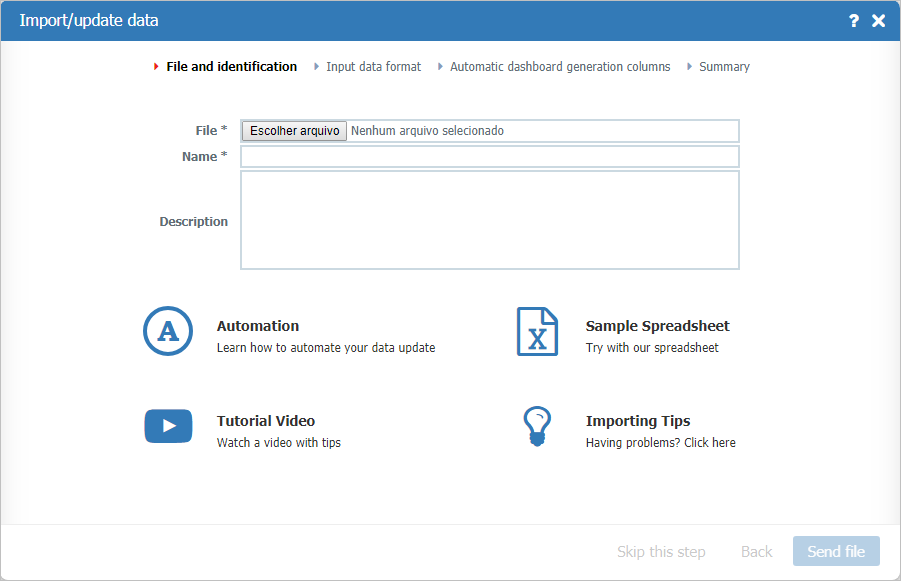
- File: Choose the file to be imported. Click on the Browser button to search your computer for files. See Supported File Formats for more information;
- Name: Datasource name. This is the name that will be displayed in the main page;
- Description: An optional description for the new datasource.
Access the links to learn more about the automating process of the data update process, to watch a Tutorial Video, to see an model worksheet and Import Tips.
Click on the Next button.
See Input Data Format for information on how to continue.
